Your Mac is slow. Blame knows why.

A menu-bar app that names what is slowing your Mac and ends only what is safe.

Free, no account · 5 MB · notarized by Apple · macOS 14 or later

Blame2 secs ago

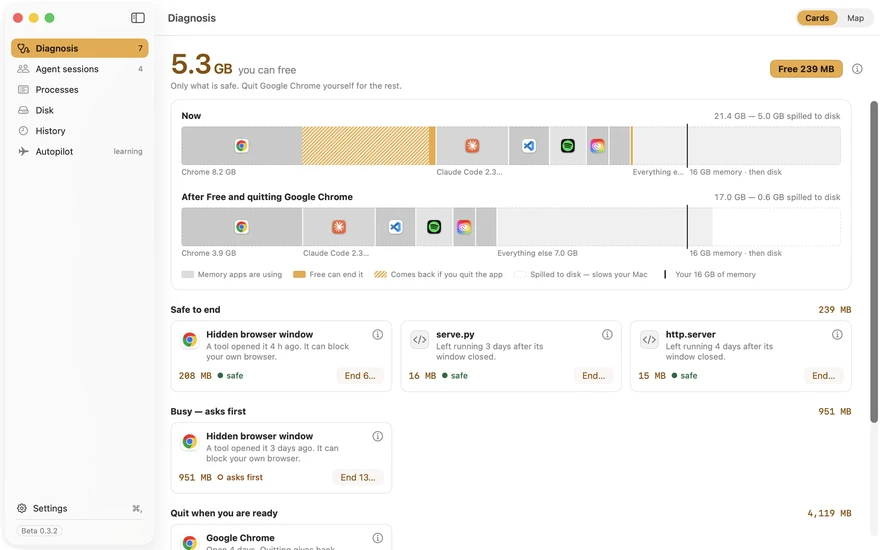
5.4GB you can free

24.6 GB used · 8.1 GB on disk

  • Google ChromeQuit. 4.8 GB back.4.8 GB
  • Hidden browser windowEnded. 509 MB back.509 MB
  • AI coding sessions 5tip

This panel works. Press Free. Download Blame

Blame 1.0.52 on the founder’s 16 GB Mac, as captured. The panel is a working copy.

On one 16 GB Mac, 11.4 GB sat in the background.

3.4 GBClaude Code’s MCP servers, across 3 sessions. Blame ends these.
8 GBDocker’s VM. Blame names it; quitting it is your call.
4.6 GBleft for everything else on the Mac
The founder’s 16 GB M3, audit of 22 Sep 2026. One cell is 1 GB.

See what yours left running. One Terminal command that only reads. It installs nothing and changes nothing.

Run the ten-second check
Shows what every AI session holds

Every slowdown, named.

Each Claude Code, Cursor, Codex, Gemini CLI or Aider session, with its age and what it holds. End one and its whole tree goes.

  • Its project, age and memory, per session
  • Programs left running after their window closed
  • End one and every child process goes with it
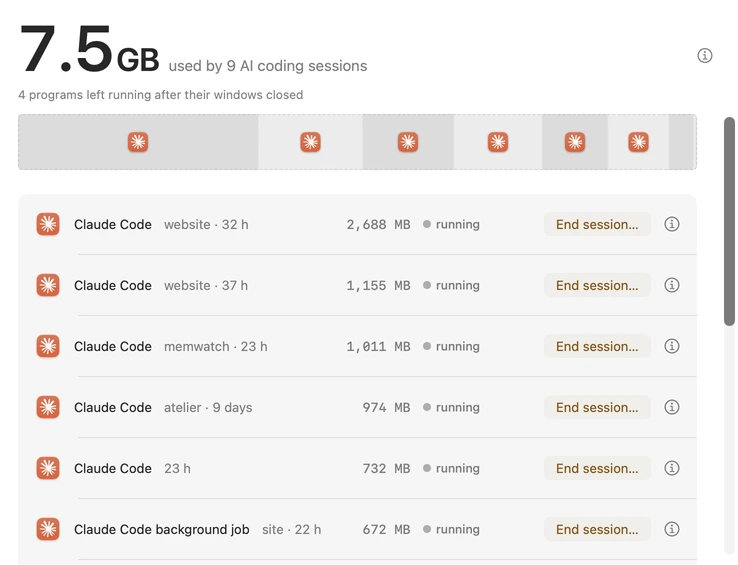
Blame’s Agent sessions screen, version 1.0.53: 7.5 GB used by 9 AI coding sessions, each Claude Code session with its project, age, memory and an End session button.

7.5 GBused by 9 AI coding sessions

  • Claude Codewebsite · 32 h2,688 MBrunning
  • Claude Codewebsite · 37 h1,155 MBrunning
  • Claude Codememwatch · 23 h1,011 MBrunning
  • Claude Codeatelier · 9 days974 MBrunning
  • Claude Code23 h732 MBrunning
  • Claude Code background jobsite · 22 h672 MBrunning

The first six rows of the Agent sessions screen, Blame 1.0.53.
Every program, with a verdict

Safe, protected or macOS.

All 519 programs running on one Mac, each marked safe to end, protected or part of macOS. Most you should leave alone, and Blame says which.

  • Sorted by memory, with how long each has run
  • Left running, apps or everything, in one switch
  • Find any program by name
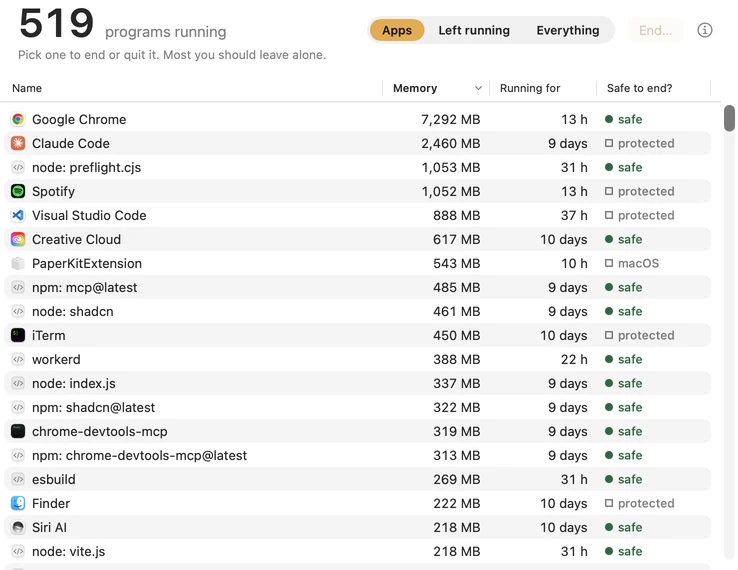
Blame’s Processes screen, version 1.0.53: 519 programs running, sorted by memory, each with how long it has run and whether it is safe to end, protected or part of macOS.

519programs running

  • Google Chrome13 h7,292 MBsafe
  • Claude Code9 days2,460 MBprotected
  • node: preflight.cjs31 h1,053 MBsafe
  • Spotify13 h1,052 MBprotected
  • Visual Studio Code37 h888 MBprotected
  • Creative Cloud10 days617 MBsafe
  • PaperKitExtension10 h543 MBmacOS
  • npm: mcp@latest9 days485 MBsafe

The first eight rows of the Processes screen, Blame 1.0.53.

With the free browser extension

Gives back what your browser holds.

Chrome held the most memory in all 107 slowdowns Blame logged on one Mac, 12–26 Oct. Blame unloads the tabs you have left, only when memory is short.

  • Never the tab in front, a pinned tab or one playing sound
  • Works in Chrome, Arc, Brave and Edge

Add to ChromeHow it works

In front

3 tabs unloaded. Click one to bring it back.

Never the tab in front, a pinned tab or one playing sound.
Autopilot, with Blame Pro

Autopilot fixes what can be undone.

Every act has a ten-minute Undo. A rule that keeps getting it wrong switches itself off.

  • Ten minutes to undo every act
  • A rule switches itself off at 5% wrong
  • Free for 7 days, then Blame Pro

See how Autopilot works

This week

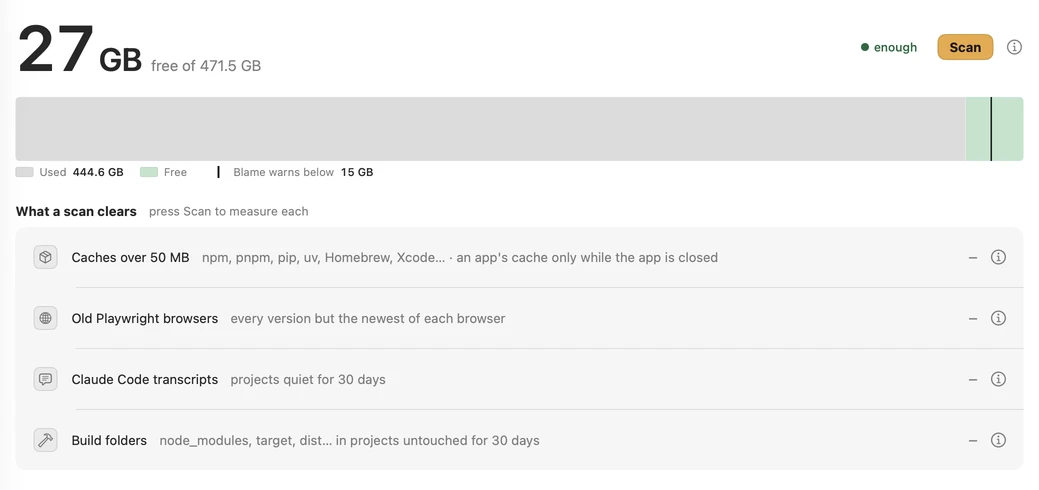
  • Moved 2.4 GB of old temp files, build output and caches to the Trash
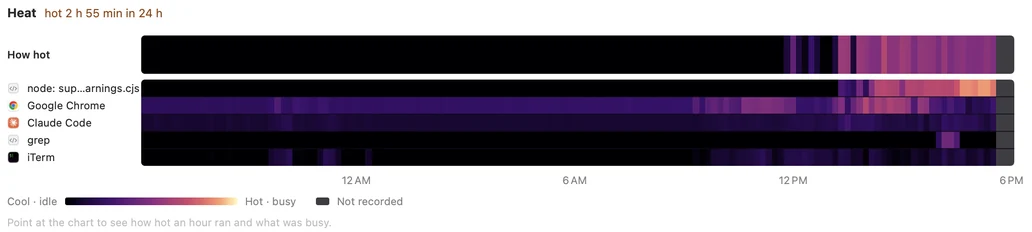
  • Cooled your Mac once by moving busy background work to the efficiency cores
  • No mistakes
Pause apps you have lefton

Drag to see what happens when a rule keeps getting it wrong.

Download free for macOS Free, no account. macOS 14 or later.

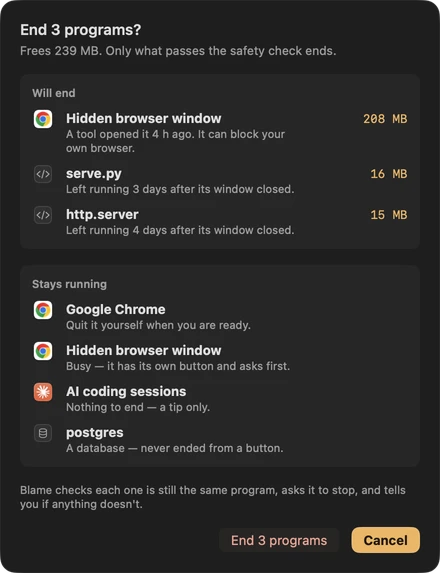
It ends only what is safe to end.

You see what will end and what stays. Cancel is the default.

Blame’s confirmation sheet: End 1 program? Will end: Hidden browser window, 511 MB. Stays running: Google Chrome, quit it yourself when you are ready; AI coding sessions, a tip only; postgres, left alone because it is a database server. Cancel is the highlighted button.
The sheet you get before every fix, from Blame 1.0.52.

11left running

Press it. Two of them are databases.

One 16 GB MacBook, 27 September 2026.

It caught 621 copies of one helper.

VS Code held 15.1 GB of a 16 GB Mac. Activity Monitor showed 621 rows with one name. Blame named the extension that started them.

One 16 GB MacBook, 8 October 2026. Read what happened

15.1GBof 16, held by VS Code

621 processes. Activity Monitor calls every one “Code Helper (Plugin)”.

621 copies of oxide-helper.js. Tailwind CSS IntelliSense 0.16.0 started them and never ended one.

Your windows and unsaved files stay open.

1.0 GB, two minutes later. Windows, unsaved files and terminals stayed where they were.

Download Blame
SidhanthFounder, and the only person behind Blame

I build Blame alone, on the 16 GB MacBook it was made for. It still makes mistakes, and I’d rather tell you than have you find out: every change is in the changelog, with the reason for it.

Free to use. Autopilot free for 7 days, then $29 once.

No subscription, and nothing about your processes leaves your Mac.

Free, forever

$0

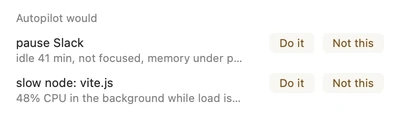
Autopilot suggests. You choose.
Blame’s panel: Autopilot would pause Slack and slow node: vite.js, each with Do it and Not this buttons.
  • What is slowing your Mac, in plain words
  • One-click fixes, safety-checked
  • Every AI coding session and what it holds
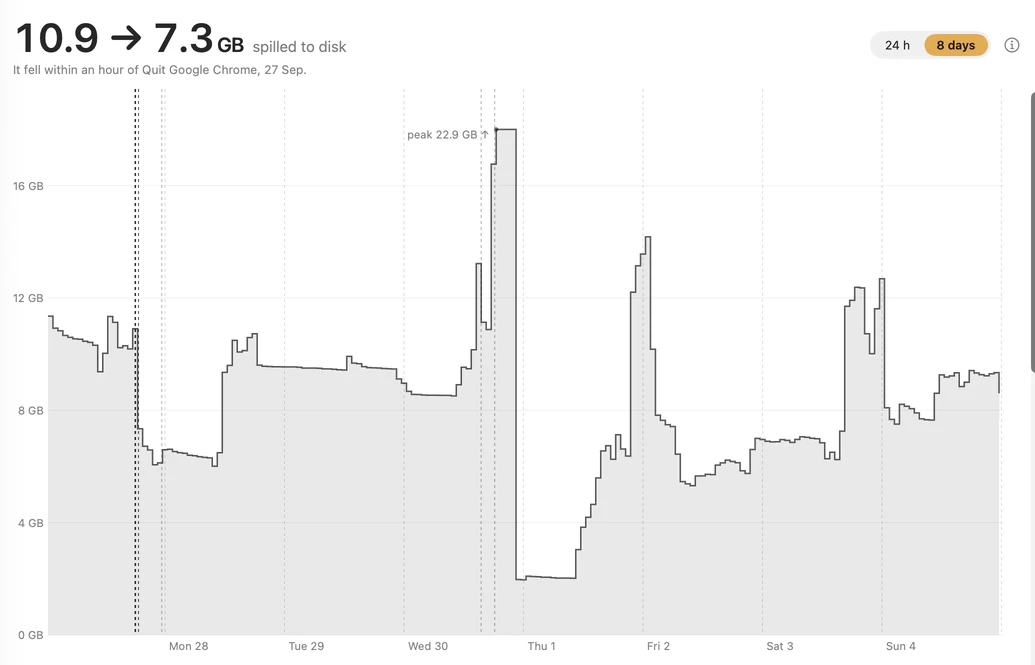
  • Heat, history and disk, hour by hour
  • Unloads idle browser tabs when you click, with the free extension
Download free

No account. macOS 14+, Apple silicon and Intel.

Blame Pro

$29once

Autopilot acts. You can undo it for ten minutes.
Blame’s panel: Paused Slack, 7 mins left, Undo. Demoted node: vite.js, 9 mins left, Undo.
  • Everything in Free, and Autopilot does it for you
  • Restarts leaking editor extensions
  • Slows busy background work and cools a hot Mac
  • Pauses apps and unloads tabs you have left
  • Cleans old build output and caches
  • All your Macs, every 1.x update
Buy Blame Pro

Try Autopilot free for 7 days first. Your key appears right after payment. See how Autopilot works

Questions

Didn’t find your answer? Write to the founder, or read why Blame exists.

Will it end something I need?

Only what passes the safety check ends. Databases are never ended from a button, a child doing protected work protects its whole tree, and every fix shows its list before you confirm.

Does Autopilot act on its own?

With Blame Pro, yes, and only where it can be undone. Old temp files and build caches go to the Trash; under 5 GB of free disk they are deleted outright. A rule that is wrong on your Mac turns itself off. Free, it only suggests, and you choose Do it or Not this.

Activity Monitor is free. Why this?

Activity Monitor lists every process. It does not say which session left a program running or whether it is safe to end. Blame names the cause and ends the whole tree after checking it is still the same program.

Stray and Node Killer are free. Why pay?

They find orphaned processes, and so does Blame, free. They do not diagnose a slow Mac or show what each AI session holds. You pay only for Autopilot acting on its own.

Why not just restart?

A restart clears memory once and closes everything you had open. The leftovers come back with your next agent session. Blame ends only those, and keeps your work running.

Does anything leave my Mac?

Nothing about your processes. Blame checks getblame.app for updates once a day, and anonymous usage counts are sent only if you switch them on. Logs stay on your Mac for 14 days. Privacy has the details.

How heavy is it?

About 50 MB of memory and 1% CPU: a median of 48 MB on the 0.3.10 release build over 5 hours on 6 Oct 2026, up to 140 MB while its window is open.

Why not the Mac App Store?

Its sandbox forbids signalling other processes, so Blame could not end anything. It is a direct download, signed with a Developer ID and notarized by Apple.

Next time your Mac slows down, you’ll know why.

Blame stays in the menu bar. One click shows what is holding your memory and ends only what is safe.

Download free for macOS Free, no account · Autopilot $29 once · macOS 14 or later